Short answer: CSRF (Cross-Site Request Forgery) is an attack where a victim's own browser sends a real, logged-in request that the attacker wants, without the victim clicking anything on the real site. In the demo below, an attacker page silently changes a logged-in user's email from victim@bank.local to attacker@evil.example. It works because the session is kept in a cookie, the browser attaches that cookie to every request, and the form carries no CSRF token and no SameSite protection.
This post is a full walkthrough. As I believe in showing the real action and not only the theory, I built a tiny lab with two apps and ran the attack against it. Whereas most articles stop at a diagram, here you will see the request, the headers, and the fix.
What is CSRF (in one line)
CSRF is when a different website makes your browser send a logged-in request to a site you are already signed in to, and that site trusts it because your cookie came along. Hence the server cannot tell the difference between you clicking a button and the attacker's page submitting the same form.
Note what CSRF is not: it does not steal your data by itself, and it does not read your screen. That is XSS, a different bug. CSRF only makes you perform an action — change an email, transfer money, add an admin — without your consent.
The lab: two apps on localhost
To see the attack clearly, two parts are needed:
- The victim app — a small "Vuln Bank" at
http://localhost:3000. It uses a session cookie for login and has a change-email form with no CSRF token. - The attacker site — an "evil" page at
http://localhost:4000that auto-submits a form to the victim's change-email endpoint.
Both run on localhost only. As this app is deliberately insecure, it must never be placed on a public or shared server.
Step by step: the attack happening
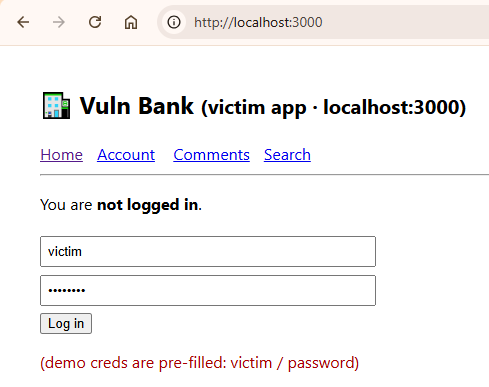
Step 1 — the victim logs in
The victim opens the bank and logs in. The credentials are pre-filled for the demo.
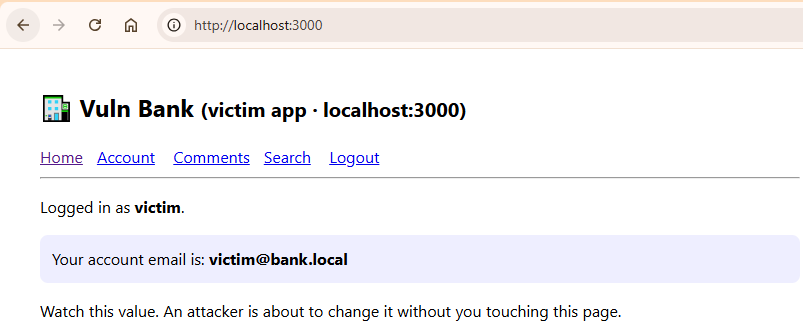
Step 2 — note the current email
After login, the home page shows the account email: victim@bank.local. This is the value we are going to change, without the victim ever touching this form.
Step 3 — the victim opens the attacker page
Now the victim visits the attacker site (a "you won a prize" lure) and clicks the link. The attacker page holds a hidden form pointed at the bank's change-email endpoint, and a one-line script submits it automatically:
<form id="f" action="http://localhost:3000/account/change-email" method="POST">
  <input type="hidden" name="email" value="attacker@evil.example">
</form>
<script>document.getElementById('f').submit();</script>
As the form submits, the browser does the one thing that makes CSRF possible: it attaches the victim's bank session cookie to this cross-site request, because the cookie has no SameSite attribute to stop it.
Step 4 — the email is now the attacker's
Back on the bank, the account email has changed to attacker@evil.example. The victim never filled this form. Their browser did it for the attacker.
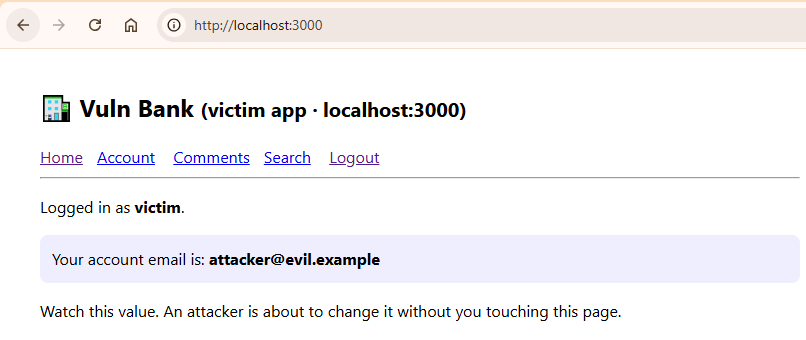
Whereas the victim only looked at a prize page, the real request landed on the bank as a fully authenticated action. Hence a password reset to the attacker's address is the obvious next step — the account is effectively taken over.
Looking under the hood with curl
To document why it worked, the response headers must be read. On Windows (cmd) or Linux, curl is already installed.
Get the headers of a page. The -D - flag dumps the response headers, and -o throws away the body (use NUL on Windows, /dev/null on Linux/Mac):
curl -s -D - -o NUL http://localhost:3000/Output:
HTTP/1.1 200 OK
Content-Type: text/html
Connection: keep-alive
Transfer-Encoding: chunked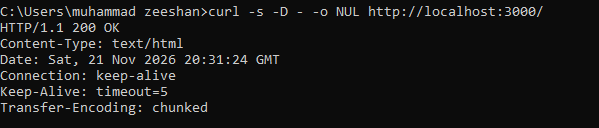
Already a problem is visible, but by what is missing: there is no Content-Security-Policy, no X-Frame-Options, and no X-Content-Type-Options. As these headers are absent, the browser is given no extra instruction to defend the page.
Now read the login cookie — the smoking gun. This sends the login and shows the Set-Cookie header:
curl -s -D - -o NUL -X POST http://localhost:3000/login -d "username=victim&password=password"Output:
HTTP/1.1 302 Found
Location: /
Set-Cookie: sid=ezz525twymdmwqv5w4p; Path=/
The whole attack lives in that one line. The session cookie is set with Path=/ and nothing else:
- No
SameSite— therefore the cookie is allowed to ride along on a cross-site POST. - No
HttpOnly— therefore JavaScript can also read it (that matters for XSS, a separate post). - No
Secure— therefore it is sent over plain HTTP too.
Tip: if you run
curl -I, that sends a HEAD request. This tiny lab only answers GET, so-Ireturns 404. Use the-D -form above to read headers from a normal GET.
How it happens, in detail
To really understand CSRF, the request flow must be followed one hop at a time. As the attack has no malware and no stolen password, it is easy to miss what is really going on.
- The victim logs in. The bank sends
Set-Cookie: sid=.... From now on, the browser stores this cookie and, as a rule, attaches it to every request going to the bank's origin. - The victim opens the attacker's page. This page sits on a different origin (
localhost:4000), but it is allowed to send a request to the bank. It cannot read the bank's pages (the same-origin policy blocks reading the response), but it can still fire a write. - The attacker's form auto-submits a POST to the bank. A form submit is a top-level request the browser is happy to send cross-site.
- The browser attaches the bank cookie. This is the key step. The browser does not ask "did the bank's own page start this request?" — it only sees a request going to the bank, so it adds the bank's cookie. This automatic, always-on authority is called ambient authority.
- The bank sees a valid session and acts. As the cookie is valid and there is no token to check, the server cannot tell this apart from the real user. Therefore it changes the email.
This is why CSRF is called a confused deputy attack. The browser is the deputy: it holds the victim's authority (the cookie), and the attacker tricks it into using that authority on the attacker's behalf. Hence the trust being abused is not the user's trust in the site, but the site's trust in the user's browser. That single sentence is the difference between CSRF and XSS.
One more point that people get wrong: the attacker never sees the response. The same-origin policy still stops the evil page from reading the bank's reply. As CSRF does not need to read anything — it only needs the action to happen — this does not save you. The damage is done the moment the request lands.
Why the attack worked
As promised, the cause is built up from the evidence above, not asserted. Three conditions were all true at once:
- The session is carried in a cookie. The browser attaches it automatically to every request to the bank, even a request started by another site.
- The change-email form has no CSRF token. Therefore the server has no secret value to check, and it cannot tell a real user's submission apart from a forged one.
- The cookie has no SameSite attribute. Hence the browser does not block it on the cross-site POST from the attacker page.
Remove any one of these and the attack breaks. That is the whole lesson: no CSRF token, no SameSite — that is the hole.
Real CSRF attacks on well-known websites
This is not only a lab trick. Some of the biggest sites on the internet shipped the same bug, and the consequences ranged from annoying to money leaving a bank account. As these cases are old and long fixed, they are safe to study, and they show exactly what CSRF can do when the action matters.
- ING Direct (2008). Princeton researchers Bill Zeller and Edward Felten found a CSRF flaw on the bank that let an attacker open an account in the victim's name and transfer the victim's money into it. This is cited as one of the first publicly disclosed CSRF flaws on a bank, and notably, using SSL did not protect the user — as CSRF rides the user's own session, encryption changes nothing.
- Netflix (2006). The site had numerous CSRF holes that allowed full account takeover — changing the subscriber's email, password, and shipping address, and adding DVDs to their queue, all without knowing the current password.
- YouTube (2008). The same Princeton study found CSRF affecting nearly every user action — adding videos to favorites, sending messages, adding friends — on a logged-in victim's behalf.
- Gmail (2007). A CSRF flaw let an attacker silently add a mail-forwarding filter to the victim's account. Whereas the other cases were one-off actions, this one was quiet and permanent: every future email was copied to the attacker, and the victim saw nothing.
- The New York Times (2008). A CSRF bug leaked a logged-in reader's email address through the "email this article" feature, useful for spam and phishing.
- Home routers (Netgear, D-Link, TP-Link). CSRF pages were used to change a router's DNS settings from inside the victim's network — called drive-by pharming — which silently redirects all of the victim's traffic.
- TikTok (2020). A reported CSRF chain contributed to an account-takeover path, showing the bug is still shipping on modern platforms, not just old ones.
The pattern across all of them is the same as your lab: a state-changing request, a cookie session, and no token or SameSite to stop a cross-site submit.
How to fix CSRF
The fix is two layers, used together (defence in depth):
- A per-request CSRF token. The server puts a secret, unpredictable token in the form, and checks it on submit. As the attacker's page cannot read that token, it cannot forge a valid request. The check must be a constant-time compare, not a loose equality.
SameSiteon the session cookie. SetSameSite=Lax(orStrictfor sensitive actions). As Lax blocks the cookie on cross-site POST, the forged request arrives with no session at all.- Add
HttpOnlyandSecureas well. These do not stop CSRF on their own, butHttpOnlyblocks the cookie theft that XSS would attempt, andSecurekeeps it off plain HTTP.
Secure code: patch the lab and watch it fail
Talk is cheap, so here is the actual fix applied to the lab's victim app. There are three changes, and together they kill the attack.
Change 1 — set a secure cookie. The session cookie must carry SameSite and HttpOnly:
// BEFORE (vulnerable): no flags
'Set-Cookie': 'sid=' + sid + '; Path=/'

// AFTER (safe): SameSite stops the cross-site send, HttpOnly stops XSS theft
'Set-Cookie': `sid=${sid}; Path=/; HttpOnly; SameSite=Lax`
// add '; Secure' as well when you serve over HTTPS
Change 2 — give each session a CSRF token. Generate an unpredictable token at login and keep it with the session:
const crypto = require('crypto');

// at login, store a token alongside the user
const sid  = crypto.randomBytes(16).toString('hex');
const csrf = crypto.randomBytes(32).toString('hex');
sessions[sid] = { user: username, csrf };
Then render it as a hidden field inside the real change-email form, so only the bank's own page can know it:
<form method="POST" action="/account/change-email">
  <input type="hidden" name="csrf_token" value="SESSION_CSRF_TOKEN_HERE">
  <input name="email" value="...">
  <button>Change email</button>
</form>
Change 3 — check the token on every state-changing POST, using a constant-time compare (never ==, which can leak the token through timing):
const crypto = require('crypto');

function safeEqual(a, b) {
  const ab = Buffer.from(String(a), 'utf8');
  const bb = Buffer.from(String(b), 'utf8');
  if (ab.length !== bb.length) return false;
  return crypto.timingSafeEqual(ab, bb);
}

// inside POST /account/change-email
if (!safeEqual(body.csrf_token, session.csrf)) {
  res.writeHead(403);
  return res.end('CSRF check failed');
}
// only now change the email
Now re-run the attack. Open the attacker page again and click the link. The forged form has no token, so the POST returns 403 CSRF check failed, and the email stays victim@bank.local. And even if you only did Change 1, SameSite=Lax alone stops the browser from sending the cookie on that cross-site POST, so the request reaches the bank with no session at all. Two independent walls — that is defence in depth.
How CSRF works in Next.js
Since packettosniff.com runs on Next.js, it is worth being exact here, because CSRF behaves differently depending on how the request is handled.
- Server Actions (App Router). Modern Next.js Server Actions check the
Originheader against the host and only accept POST. As a cross-site page has a different Origin, a classic form-CSRF is blocked for Server Actions out of the box. - Route Handlers / API routes. These have no automatic CSRF protection. Whereas a Server Action defends itself, an API route does not — therefore you add the token and the SameSite cookie yourself.
- Token vs cookie auth. As the browser only auto-sends cookies (not an
Authorizationheader), an API that authenticates with a bearer token in a header is not exposed to classic CSRF. The forged request simply arrives with no token. Hence the real question is never "is Next.js safe" but "is the session in a cookie, and is a token being checked."
So on a Next.js site, the practical rule is: set sameSite: 'lax' and httpOnly: true on the session cookie, keep sensitive actions behind Server Actions or a checked CSRF token, and never trust an API route to defend itself.
Secure code in Next.js
Set the session cookie safely with the cookies() helper:
import { cookies } from 'next/headers';

cookies().set('session', sessionId, {
  httpOnly: true,
  sameSite: 'lax',                                   // blocks the cross-site POST
  secure: process.env.NODE_ENV === 'production',     // HTTPS only in prod
  path: '/',
});
For an API Route Handler, which has no built-in protection, add an Origin check so a cross-site page is rejected:
// app/api/change-email/route.ts
export async function POST(req: Request) {
  const origin = req.headers.get('origin');
  const host = req.headers.get('host');

  // reject any request whose Origin is not our own site
  if (!origin || new URL(origin).host !== host) {
    return new Response('CSRF: bad origin', { status: 403 });
  }

  // ...safe to proceed with the state change
}
Whereas a Server Action already performs this Origin check for you, a Route Handler does not — hence you write it yourself, exactly as above, and pair it with the SameSite cookie.
FAQ
What is a CSRF attack in simple words? It is when another website makes your browser send a real, logged-in request to a site you are signed in to, so the site performs an action you never agreed to.
Does CSRF steal passwords or data? No. CSRF makes you perform an action, such as changing an email or moving money. Stealing data from the page is XSS, which is a different vulnerability.
How is CSRF different from XSS?
CSRF forces an action using your existing session. XSS runs the attacker's JavaScript inside the page and can read data or cookies. They are often confused because both can involve a <script> tag, but the goal is different.
What single change stops most CSRF?
Setting SameSite=Lax (or Strict) on the session cookie, because it stops the browser from sending the cookie on a cross-site POST. A per-request CSRF token is the second layer.
Is Next.js safe from CSRF by default? Partly. Server Actions check the request Origin and are protected. API route handlers are not — you must add a CSRF token and a SameSite cookie yourself.
Why did the demo need me to be logged in first? Because CSRF rides on your existing session. With no session cookie, the forged request has nothing to attach, and the bank rejects it.
Try it yourself
I have packaged this exact lab (two small apps, no dependencies) so you can run the attack on your own machine and watch the email change. Practising on a safe, deliberately vulnerable app is the right way to learn these bugs — never on a site you do not own.
This walkthrough is part of my web security series on PacketToSniff. Next in the series: stealing the session cookie with stored XSS.